openmarkets
OpenMarkets MCP Server
OpenMarkets is a Model-Context-Protocol (MCP) server implemented in Python to stream real-time, structured multi-asset market data for quantitative research and AI-driven trade execution. It supports agentic retrieval of financial data and is designed for integration with LLM applications and automated trading systems.
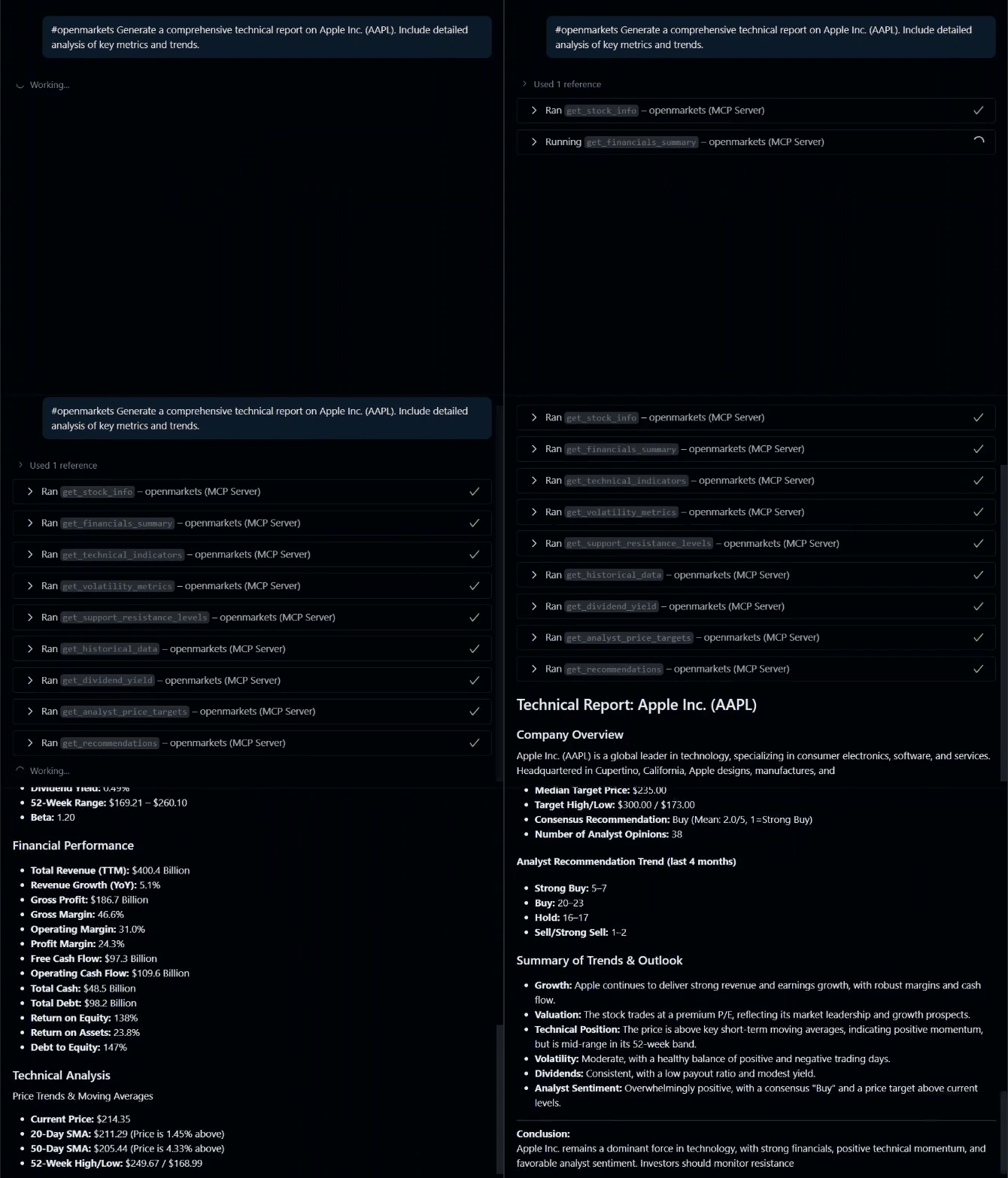
Key Features
- Real-time and historical market data streaming
- Multi-asset support: equities, ETFs, crypto, and more
- Get basic stock information (price, market cap, sector, etc.)
- Fetch historical price data with customizable periods
- Retrieve analyst recommendations
- Access dividend history
Usage
This MCP server can be used with various LLM applications that support the Model Context Protocol:
- Claude Desktop: Anthropic’s desktop application for Claude
- Cursor: AI-powered code editor with MCP support
- Custom MCP clients: Any application implementing the MCP client specification
Usage with Claude Desktop
- Install Claude Desktop from https://claude.ai/download
-
Open your Claude Desktop configuration:
- macOS:
~/Library/Application Support/Claude/claude_desktop_config.json - Windows:
%APPDATA%\Claude\claude_desktop_config.json
- macOS:
- Add the following configuration:
{
  "mcpServers": {
    "openmarkets": {
      "command": "uvx",
      "args": [
        "openmarkets@latest"
      ]
    }
  }
}
- Restart Claude Desktop
Usage with VS Code
For quick installation, use one of the one-click installation buttons below:


For manual installation, add the following JSON block to your User Settings (JSON) file in VS Code. You can do this by pressing Ctrl + Shift + P and typing Preferences: Open Settings (JSON).
Optionally, you can add it to a file called .vscode/mcp.json in your workspace. This will allow you to share the configuration with others.
Note that the
mcpkey is not needed in the.vscode/mcp.jsonfile.
UVX
{
  "mcp": {
    "servers": {
      "openmarkets": {
        "command": "uvx",
        "args": [
          "openmarkets@latest"
        ]
      }
    }
  }
}
Available Tools
This MCP server provides a variety of tools for retrieving financial data. Below is a list of available tools and their main arguments:
Stock Information
- get_stock_info(ticker: str)
Get basic information about a stock.
Historical Data
- get_historical_data(ticker: str, period: str = “1mo”, interval: str = “1d”)
Get historical price data for a stock. - get_multiple_tickers(tickers: list[str], period: str = “1d”)
Get data for multiple stocks at once. - download_bulk_data(tickers: list[str], period: str = “1mo”, interval: str = “1d”, …)
Download bulk historical data for multiple tickers. - get_ticker_history_metadata(ticker: str)
Get available periods, intervals, and metadata for a ticker.
Analyst Data
- get_recommendations(ticker: str)
Get analyst recommendations for a stock. - get_analyst_price_targets(ticker: str)
Get analyst price targets. - get_upgrades_downgrades(ticker: str)
Get recent upgrades and downgrades. - get_recommendations_summary(ticker: str)
Get recommendations summary.
Corporate Actions
- get_dividends(symbol: str, period: str = “5y”)
Get dividend history for a stock. - get_splits_history(symbol: str, period: str = “5y”)
Get stock split history.
Market Data
- get_market_status()
Get current US market status. - get_trending_tickers(region: str = “US”, count: int = 10)
Get trending/popular tickers. - get_sector_performance()
Get sector performance using ETFs. - get_index_data(indices: list[str] = None)
Get data for major market indices.
Calendar & Market Hours
- get_market_calendar_info(ticker: str)
Get market calendar and session info. - get_market_hours(ticker: str)
Get market hours and session information. - get_exchange_info(ticker: str)
Get detailed exchange and trading information.
Screener & Search
- screen_stocks_by_criteria(…)
Screen stocks by market cap, P/E, dividend yield, sector, etc. - get_similar_stocks(ticker: str, count: int = 5)
Find similar stocks by sector and market cap. - get_top_performers(period: str = “1mo”, sector: str = None, count: int = 10)
Get top performing stocks.
Technical Analysis
- get_technical_indicators(ticker: str, period: str = “6mo”)
Get technical indicators (SMA, price position, etc.). - get_volatility_metrics(ticker: str, period: str = “1y”)
Get volatility and risk metrics. - get_support_resistance_levels(ticker: str, period: str = “6mo”)
Get support and resistance levels.
Options
- get_options_expiration_dates(ticker: str)
Get available options expiration dates. - get_option_chain(ticker: str, expiration_date: str = None)
Get option chain for a ticker. - get_options_volume_analysis(ticker: str, expiration_date: str = None)
Analyze options volume and open interest. - get_options_by_moneyness(ticker: str, expiration_date: str = None, moneyness_range: float = 0.1)
Filter options by proximity to current price.
Financial Statements
- get_financials_summary(ticker: str)
Get key financial metrics summary.
Funds & ETFs
- get_fund_profile(ticker: str)
Get fund/ETF profile. - get_fund_holdings(ticker: str, count: int = 20)
Get top holdings of a fund/ETF. - get_fund_sector_allocation(ticker: str)
Get sector allocation of a fund/ETF. - get_fund_performance(ticker: str)
Get fund/ETF performance metrics. - compare_funds(tickers: list[str])
Compare multiple funds/ETFs.
Crypto
- get_crypto_info(crypto_symbol: str)
Get cryptocurrency info. - get_crypto_historical_data(crypto_symbol: str, period: str = “1mo”, interval: str = “1d”)
Get historical data for a cryptocurrency. - get_top_cryptocurrencies(count: int = 10)
Get data for top cryptocurrencies. - get_crypto_fear_greed_proxy(crypto_symbols: list[str] = None)
Get a proxy for crypto fear/greed index.
Currency & Validation
- get_currency_data(base_currency: str = “USD”, target_currencies: list[str] = None)
Get currency exchange rates. - validate_tickers(tickers: list[str])
Validate if tickers are valid and available.